Aim Assist · 8 min read · 2026-09-25
Enhance Your Mechanics with Subtle Aim Assist in TF2
Configure smooth TF2 aim assist with controlled FOV, tracking strength, class profiles, and natural target switching.
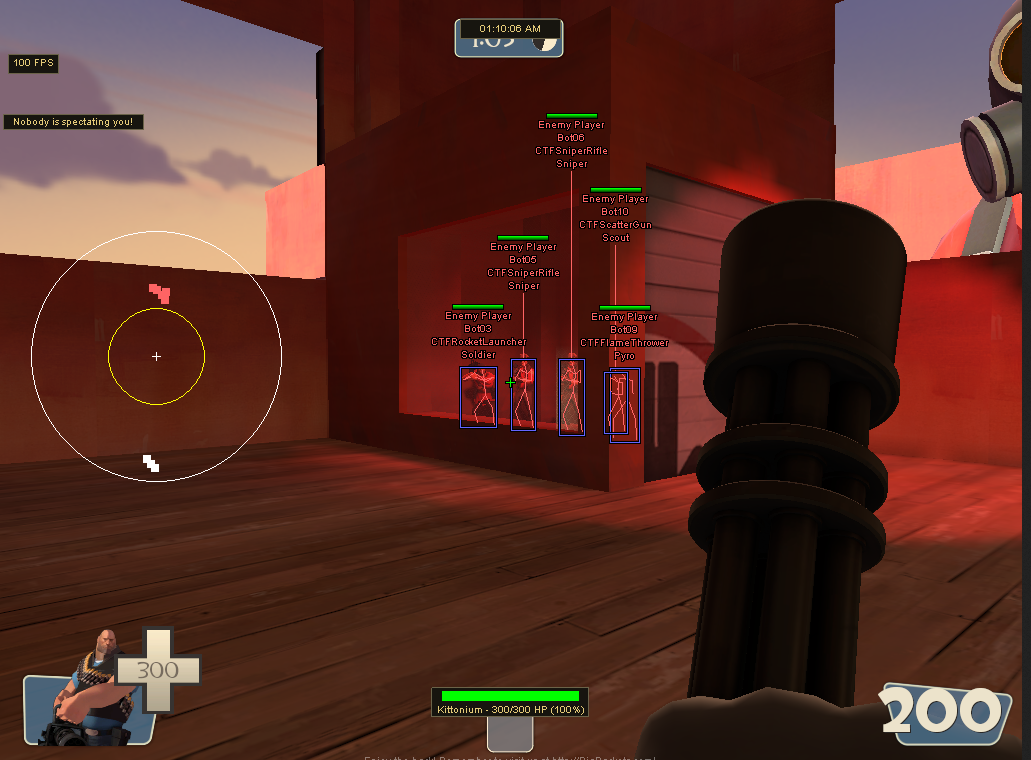
What subtle aim assist does in TF2
Aim assist in TF2 adds controlled correction while you keep moving the mouse. It is designed around softer tracking rather than an instant lock.
The feature works best when it supports existing crosshair placement. A narrow activation area and gradual movement keep target changes predictable during fast fights.
Unlike a hard lock, subtle assist should release cleanly when the target leaves the chosen field of view or moves behind solid cover.
The settings that control the feel
Field of view, smoothing, strength, activation key, and target priority shape the result. Small changes can feel very different on Scout, Heavy, and Sniper.
Field of view
A smaller field selects targets close to the crosshair. This rewards normal crosshair placement and reduces unexpected switches.
A wider field helps in close-range fights but can pull toward a player you were not trying to track. Increase it slowly and test in busy areas.
Smoothing and strength
Smoothing controls how quickly the crosshair reaches the selected point. Strength controls how much correction is added to your own mouse input.
Start with moderate smoothing and low strength. Increase only one value at a time so you can tell which change improved or weakened tracking.
Class and weapon profiles
Scout needs faster correction for close movement. Heavy can use steadier torso tracking because the minigun stays active across a longer burst.
Sniper benefits from a very small field and precise activation rules. Engineer and shotgun Pyro can use settings close to Scout, but usually with less aggressive tracking.
Projectile weapons need lead calculations, not just crosshair correction. Use the TF2 aimbot guide for projectile prediction and hitbox details.
Target selection and team filters
Crosshair distance is the most natural target priority for subtle assist. It keeps the feature focused on the opponent you are already aiming near.
Enable visibility checks, team check, and enemy-only selection. These filters stop aim correction from following teammates or targets behind cover.
Use class and health information from the TF2 ESP article when you need better target context without widening the aim field.
A simple setup process
Choose one hitscan class, set a narrow field, and begin with low correction strength. Track moving players manually and watch whether the assist adds too much or too little movement.
Adjust smoothing next, then save the profile. Make a separate copy for each weapon group instead of changing a working profile before every match.
Players comparing the full aim, ESP, and radar package can check tf2 cheats for current features, status, and plans.
Ready for tf2 cheats?
Check live VAC status, then buy aimbot, ESP, and radar for Team Fortress 2 on tf2cheat.com. Need help? Read support or player reviews. Own the game via the official site.
Community replies
Discussion prompts based on common player questions.
scatterstep
Scout · 2026-09-25
Low strength feels much easier to control than a wide lock. It still leaves room for my own flicks.
minigunmain
Heavy · 2026-09-25
Heavy needed more smoothing than Scout for me. The longer tracking window makes sharp correction unnecessary.
sentrynook
Engineer · 2026-09-25
Saving a shotgun profile stopped me from changing the same three values every round.
Frequently asked questions
How is aim assist different from aimbot?
Aim assist adds correction to your mouse movement, while a hard aimbot can take direct control of target tracking. Assist usually uses softer strength and smoothing.
What FOV should subtle aim assist use?
Start narrow so targets must already be near the crosshair. Increase it only if fast close-range movement regularly escapes the activation area.
Does aim assist work with projectile weapons?
Basic correction is not enough for moving projectiles. Rockets, grenades, and arrows also need speed, gravity, and target-lead calculations.
Why should I use separate class profiles?
Classes move and fire differently. Separate profiles preserve good Scout, Heavy, Sniper, and projectile settings without constant retuning.