ESP · 10 min read · 2026-09-25
See Everything: Why ESP is the Most Tactical Advantage in TF2
Build a readable TF2 ESP overlay with player boxes, skeletons, health, class, distance, and team filters.
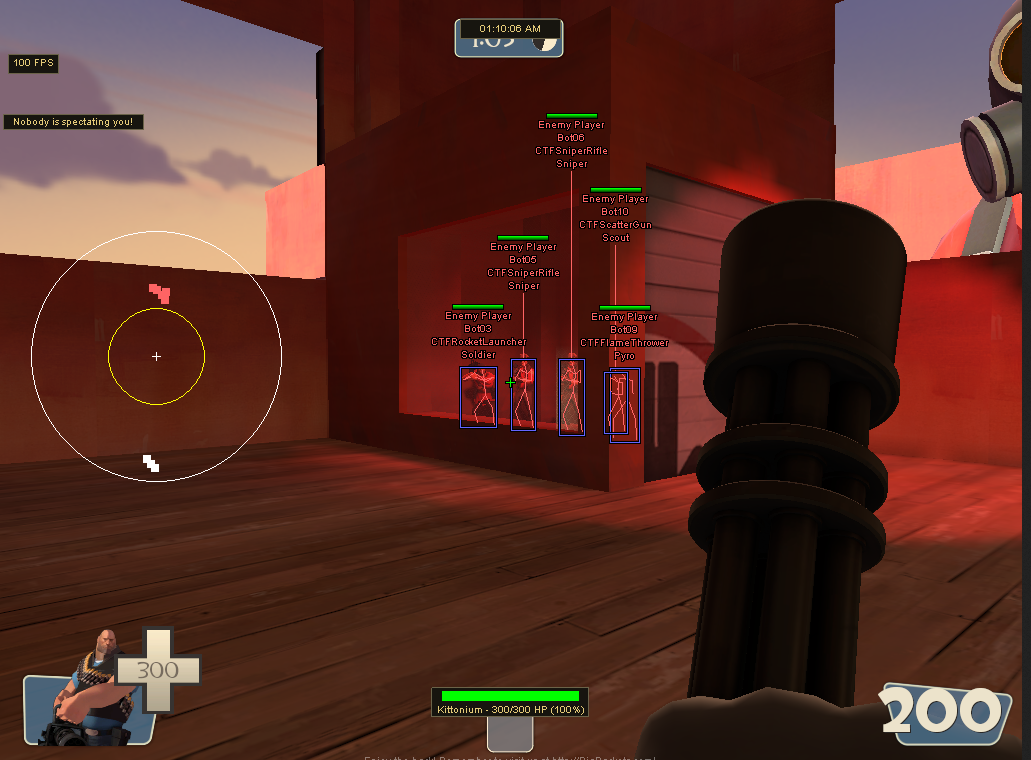
Why TF2 ESP changes tactical decisions
TF2 ESP displays player information beyond the normal line of sight. It can show location, class, health, name, distance, and model position before an enemy enters the open.
That information helps with target priority, flank awareness, and timing. A Medic behind a Heavy creates a different decision from a lone low-health Scout.
The best overlay is readable, not crowded. Every enabled element should answer a useful question during a fight.
Player, box, and skeleton ESP
Player ESP is the main category for enemy information. Box and skeleton styles are two ways to show the same position.
Box ESP
A full box shows the player boundary clearly. Corner boxes use less screen space and work well when several enemies are close together.
Boxes are easy to read at medium range. Use distance limits so far-away markers do not cover the center of open maps.
Skeleton ESP
Skeleton lines show model posture and limb position. They can help distinguish standing, crouching, and partial cover.
Skeletons add more detail than most fights need. Combine them with a simple box only when the extra posture information remains clear.
Health, class, name, and distance
Health ESP shows whether a target is ready to push or close to retreating. A bar is quick to scan, while a number provides exact information.
Class ESP identifies all nine classes. This is especially useful for spotting Medics, disguised movement, Sniper sightlines, and fast flank classes.
Names help track specific players, while distance labels explain whether a weapon is inside its useful range. Disable either label when the screen becomes crowded.
Team check and enemy-only filters
Team check separates RED and BLU. Enemy-only mode removes friendly markers so the overlay focuses on players who affect the next decision.
Use the same colors and filters across ESP, aimbot, and radar. Consistent information prevents a friendly marker from looking like an aim target.
Visibility colors can show whether the map blocks a direct shot. Keep visible and hidden colors different enough to read quickly.
Create a clean ESP layout
Start with a corner box, health bar, class label, and team check. Add distance on open maps and skeletons only when model posture matters.
Set maximum distance for each element. Player information can use a longer range than names or skeletons, which become hard to read when small.
Keep pickup markers in a separate color group. Health packs, ammo, and objectives should never look like players.
Map-specific use
Payload maps benefit from class and health information around the cart. Control-point maps need flank awareness and shorter distance limits around enclosed points.
Capture-the-flag maps can use objective and player markers together, but objective labels should stay below player priority.
Players comparing the complete visual toolkit, plans, and live status can review tf2 cheats before choosing their setup.
Ready for tf2 cheats?
Check live VAC status, then buy aimbot, ESP, and radar for Team Fortress 2 on tf2cheat.com. Need help? Read support or player reviews. Own the game via the official site.
Community replies
Discussion prompts based on common player questions.
ubercount
Medic · 2026-09-25
Health and class labels give me more useful information than a full skeleton. Simpler is much easier near the cart.
flankroute
Scout · 2026-09-25
Shorter name distance fixed most of my clutter while keeping boxes visible across the point.
wrenchline
Engineer · 2026-09-25
Separate pickup colors are essential. Ammo markers looked too similar to players in my first layout.
Frequently asked questions
Which ESP options should I enable first?
Start with box ESP, health, class, and team check. Add distance, names, or skeletons only if the display stays readable.
What is the difference between box and skeleton ESP?
Boxes show the player boundary. Skeletons show model posture and limb position but add more visual detail.
Why use enemy-only ESP?
It removes friendly markers, reducing clutter and keeping the overlay focused on opponents.
Should every ESP element use the same distance?
No. Boxes and class labels can remain useful farther away, while names and skeletons often need a shorter limit.